
Choosing a Browser for the Dark Web
Choosing the right browser for the dark web can be a critical decision for ensuring both safety and privacy. Browsers like Tor have been specifically designed to help users access the dark web while maintaining anonymity. When navigating these hidden parts of the internet, it’s essential to prioritize security features, such as encryption and protective measures against tracking. Utilizing a reliable browser will not only enhance your browsing experience but also keep your sensitive information safe.
Overview of Dark Web Browsers
When it comes to exploring the dark web, the choice of browser is critical for ensuring both security and functionality. Unlike the surface web, the darknet operates on hidden networks that require specialized tools to access. This necessitates a careful selection of browsers, each offering unique features aimed at keeping users safe while navigating this obscure part of the internet.
The most popular choice for accessing the darknet is the Tor Browser. Built on Mozilla Firefox, it routes your connection through multiple servers, effectively masking your identity by obscuring your IP address. This enhances privacy significantly, making it difficult for anyone to track your online activities. Tor does come with its limitations, such as slower browsing speeds due to the layered encryption process, but many users find that the trade-off is worth it for added security.
Another option is the I2P (Invisible Internet Project), which is designed to work more like a peer-to-peer network. I2P focuses on providing anonymous communication and hosting services without the reliance on a centralized server. While it can be more complex to set up compared to Tor, it offers users a different layer of privacy, particularly appealing to those looking for discrete file sharing and email services.
For those interested in a more comprehensive solution, there are browsers that incorporate additional security features. For example, a VPN (Virtual Private Network) can be combined with a browser for an extra layer of anonymity. While some specialized browsers do exist, they may not have the extensive user community and resource support that Tor and I2P have built over the years.
Ultimately, the best browser for the darknet will depend on your specific needs and comfort level with technology. It’s vital to stay informed about the latest updates and vulnerabilities, as security on the dark web is an ongoing concern. Make educated choices, keep your software updated, and you’ll find a browsing experience that meets your demands for privacy and security in this unique online space.
Importance of Privacy
When venturing into the dark web, selecting the right browser is crucial for ensuring your privacy and security. The dark web is a portion of the internet that isn’t indexed by traditional search engines, often requiring specialized software to access. This part of the web can host various activities, some of which can be risky. Therefore, it’s vital to choose a browser that prioritizes user anonymity and safeguards personal data.
One of the most well-known browsers for dark web access is Tor. It routes your internet traffic through a series of volunteer-operated servers, making it difficult to trace your activity back to you. However, while Tor offers significant privacy enhancements, it’s not infallible. Users must be aware of potential vulnerabilities and practice safe browsing habits to enhance their security further.
Another alternative is I2P, a lesser-known option that operates on a different model than Tor. While Tor is designed primarily for accessing hidden services and websites on the dark web, I2P focuses on providing a hidden network where users can communicate without being observed. This makes it an excellent choice for those who prioritize their privacy and wish to engage in anonymous communications.
In addition to choosing a suitable browser, it’s essential to adopt best practices for an enhanced browsing experience. This includes using a reputable Virtual Private Network (VPN) in conjunction with your browser, avoiding the sharing of personal information, and staying informed about the risks associated with dark web activities. Ultimately, the importance of privacy cannot be overstated when navigating the dark web.
In summary, whether you choose Tor, I2P, or another browser, ensuring privacy and security should be your top priority. The dark web may offer vast opportunities for exploration, but without the right precautions, it can expose you to various threats. Always remain vigilant and informed as you navigate this uncharted territory.
Tor Browser
When it comes to exploring the depths of the dark web, Tor Browser stands out as a crucial tool for maintaining your privacy and security online. Designed specifically for accessing hidden services and ensuring your anonymity, this browser allows users to navigate the dark web with greater ease and safety. By utilizing a unique network of volunteer-operated servers, Tor Browser encrypts your data and routes it through multiple nodes, making it nearly impossible for anyone to trace your online activities. If you’re looking to delve into the myriad of resources available on the dark web, understanding how to use Tor effectively is essential for preserving your anonymity while you explore.
Installation and Setup
The Tor Browser is a specialized web browser designed to facilitate anonymous communication and browsing on the internet, particularly within the dark web. It enhances your privacy by routing your connection through multiple volunteer-operated servers, effectively masking your IP address. This makes it a popular choice for users who prioritize security while exploring less mainstream areas of the web.
To get started with Tor Browser, follow these steps for installation and setup:
- Download the Tor Browser: Visit the official Tor Project website and download the latest version of the Tor Browser for your operating system (Windows, macOS, or Linux).
- Install the Tor Browser: After downloading, run the installation file. Follow the on-screen instructions to complete the installation process.
- Launch the Tor Browser: Open the Tor Browser from your applications or program menu. The first time you launch it, you’ll see a welcome screen.
- Connect to the Tor Network: Click the “Connect” button to start connecting to the Tor network. Once connected, the browser interface will appear.
- Adjust your security settings: Before you start browsing, it’s wise to adjust your security settings. Click on the shield icon next to the URL bar and choose your desired security level. This can help enhance your security while browsing.
- Begin browsing: You can now enter websites or search for content, keeping in mind to practice safe browsing habits on the dark web.
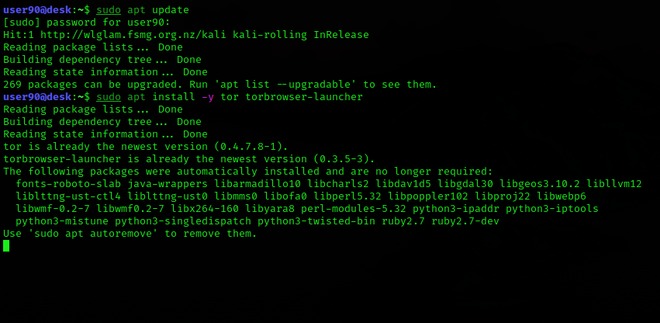
By following these steps, you’ll be well-equipped to explore the dark web with a focus on maintaining your privacy and security. Always remain vigilant and aware of the potential risks involved in dark web activities.
Connecting to a Bridge
The Tor Browser is an essential tool for accessing the dark web while maintaining your anonymity and security. One of the unique features of the Tor network is its use of bridges, which can help users bypass censorship and connect when direct access is otherwise blocked. Connecting to a bridge can be particularly important if you live in a country with heavy internet restrictions.
To connect to a bridge, first, you need to get bridge addresses, which you can request from the Tor Project’s website or through alternative means if you’re unable to access the Tor site directly. Once you have the addresses, open the Tor Browser and go to the connection settings. Here, you will find an option to use a bridge. Simply enter the bridges you obtained, and the browser will attempt to connect to the Tor network via these alternative routes.
Using bridges not only aids in reaching the dark web safely but also enhances your privacy by making it harder for anyone to monitor your connection. It is vital to stay informed on the latest methods and tools for secure browsing. Ultimately, the dark web browser experience is significantly improved when you know how to utilize these bridges effectively.
In summary, connecting to a bridge is a straightforward process that plays a critical role in ensuring a smooth and secure browsing experience on the dark web. By taking these proactive steps, you can access the vast resources available while keeping your identity secure.
Common Connection Issues
Tor Browser is a popular choice for users looking to access the dark web while prioritizing their online privacy. Built on the foundation of the Tor network, it offers enhanced anonymity by routing your internet traffic through multiple servers before reaching its final destination. Despite its advantages, users may encounter a few common connection issues that can hinder their browsing experience.
One of the most frequent problems users face is slow connection speeds. This can be attributed to the nature of the Tor network, which relies on a series of volunteer-operated relays. Because your data travels through several nodes, it can result in slower speeds compared to conventional browsing. To improve this, make sure you are connected to the optimal relay by restarting the Tor Browser or checking your connection settings.
Another common issue is difficulty connecting to specific onion sites. This can happen if the site is currently down or if there are network restrictions in your area. In such cases, using a different exit node or checking online forums for site status updates can be helpful to determine if others are experiencing similar issues.
For users experiencing frequent disconnections, it may help to adjust the security settings within the Tor Browser. While higher security levels provide more protection, they can also limit the functionality of certain websites. Striking a balance between security and usability is essential to ensure a smoother experience.
In summary, while Tor Browser effectively offers users a way to explore the dark web while maintaining anonymity, it is not without its challenges. By understanding common connection issues and making necessary adjustments, users can more effectively navigate this unique browsing environment.
System Clock Accuracy
The Tor Browser serves as a vital tool for individuals seeking to navigate the dark web securely and anonymously. This browser utilizes the Tor network, which protects user identity by routing internet traffic through a series of volunteer-operated servers around the globe. This process adds layers of security, making it difficult for others to track a user’s online activities.
One critical aspect that can influence the performance of the Tor Browser is the system clock accuracy. If the system clock on your device is not synchronized correctly, it can lead to connection issues or improper functionality of the browser. When navigating sites that require time-sensitive actions, inaccurate system time can create obstacles. Therefore, ensuring that your system clock is accurate is essential for a smooth browsing experience.
Using the Tor Browser not only provides a layer of anonymity for exploring the dark web, but it also emphasizes the need for users to maintain their systems for optimal performance. By taking care of details like system clock settings, you improve your browsing experience while safeguarding your privacy against potential threats.
Security Features
The Tor Browser is a specialized web browser designed to provide users with enhanced privacy and security while browsing the internet, particularly when accessing the deep web. It operates on the Tor network, which anonymizes user traffic by routing it through multiple servers, making it extremely difficult for anyone to track online activities.
One of the main security features of the Tor Browser is its ability to encrypt user data multiple times, ensuring that even if a piece of traffic is intercepted, it remains unreadable. This is especially important for individuals concerned about their privacy or those living in regions with restrictive internet policies. By using the Tor network, users can access websites typically not indexed by traditional search engines, granting them entry into the deep web.
Additionally, the Tor Browser comes equipped with built-in protection against various online threats. It blocks tracking cookies, prevents browser fingerprinting, and includes a feature that guards against certain types of cyber attacks. Regular updates enhance its security features, adapting to new vulnerabilities and threats as they arise.
Overall, the Tor Browser serves as a crucial tool for anyone looking to navigate the darker corners of the internet safely. Its emphasis on privacy and security makes it a preferred choice for those who prioritize their anonymity online.
Blocking Plugins
The Tor Browser is a well-known tool for accessing the dark web, designed to enhance user privacy and security while browsing. By routing your connection through various volunteer-operated servers, it obscures your IP address and helps protect your identity. This added layer of anonymity is particularly important for users looking to explore the dark web, where privacy can be easily compromised.
One of the key features of the Tor Browser is its built-in capability to block certain plugins and scripts that may jeopardize your privacy. By default, the browser disables many common add-ons and extensions, which are often used to track users’ online activities. This helps to reduce the risk of exposure to malicious content and prevents third parties from easily gathering information about your browsing habits.
While accessing the dark web, it’s crucial to keep your privacy in mind. Disabling unnecessary features and plugins further enhances your protection. Users should be aware that many browser extensions can leak data, even if you are using the Tor network. Therefore, sticking to the default settings of the Tor Browser can significantly heighten your security.
In conclusion, the Tor Browser is a powerful tool for those looking to venture into the dark web while maintaining their anonymity. Its design prioritizes privacy, making it a preferred choice for users seeking to keep their online activities secure and private.
No Additional Add-ons
The Tor Browser is a specialized web browser designed to help users access the deep web and dark web safely and anonymously. It routes internet traffic through the Tor network, which consists of multiple volunteer-operated servers, making it difficult for anyone to trace the user’s identity or location. This makes the Tor Browser an essential tool for those who wish to explore the dark corners of the internet while maintaining a level of privacy and security.
When using the Tor Browser, you don’t need any additional add-ons to ensure your privacy; it comes pre-configured with various built-in protections. Here are some key features of the Tor Browser:
- Anonymity: Tor hides your IP address by routing your connection through multiple relays before reaching the final destination.
- Access to Hidden Services: The browser allows users to access .onion sites, which are only reachable through the Tor network.
- Enhanced Security: The browser is designed to protect against various types of surveillance and tracking.
- No Tracking Cookies: Tor does not save browsing history or cookies, ensuring that your sessions remain private.
It’s important to understand that while the Tor Browser provides a layer of anonymity, users should still practice caution, especially when accessing dark web content. Security is paramount, so always be mindful of the websites you visit and the information you share while browsing.
HTTPS-Only Mode
When it comes to browsing the dark web, many users turn to the Tor Browser as their tool of choice. This specialized browser is designed to offer privacy and anonymity while navigating the web’s hidden corners. One of its standout features is HTTPS-Only Mode, which enhances security by ensuring that connections are made over secure HTTPS protocols wherever possible.
By activating HTTPS-Only Mode in the Tor Browser, users can significantly reduce the risks associated with insecure sites. This mode automatically upgrades HTTP connections to HTTPS, providing an extra layer of encryption. This is especially important in the deep web, where many sites may not prioritize security. Enabling this feature is a simple yet effective way to protect sensitive information during your browsing sessions.
Moreover, the Tor Browser’s ability to mask your IP address while routing traffic through various nodes adds another layer of protection. This combination of anonymity and secure connections makes it a popular choice for those looking to explore the dark web safely. Users can navigate through the vast and often complex landscape of hidden services without leaving a trace, allowing for a more secure experience overall.
- All you’ll need is an 8GB thumb drive, an installation package, and a couple of minutes to get things up and running.
- Yes, but only as long as you download it from official sources, like Tor’s official website.
- Aside from the potential for illegal actions, certain countries, such as China, Iran, and Russia, have banned it completely.
- The deep web contains regular websites which authorized users can only access.
In conclusion, the Tor Browser, equipped with HTTPS-Only Mode, creates a safer environment for users venturing into the deep web. With its focus on privacy and security, it continues to be an essential tool for those seeking both the anonymity of the dark web and the safety of encrypted connections.
NoScript Functionality
The Tor Browser is specifically designed to facilitate anonymous browsing, making it a vital tool for anyone looking to access the dark web safely. Unlike traditional web browsers, Tor enables users to navigate the internet without revealing their identity or location, which is essential for maintaining privacy. One of the standout features of the Tor Browser is its integration with the NoScript functionality, which plays a crucial role in enhancing user security.
NoScript allows users to control which scripts can run on websites, effectively preventing potentially harmful elements from executing without consent. This is particularly important when exploring the i deep web i, where many sites may carry risks like malware or unwanted tracking. By selectively enabling scripts on trusted sites, users can significantly lower their exposure to threats while still enjoying a rich browsing experience.
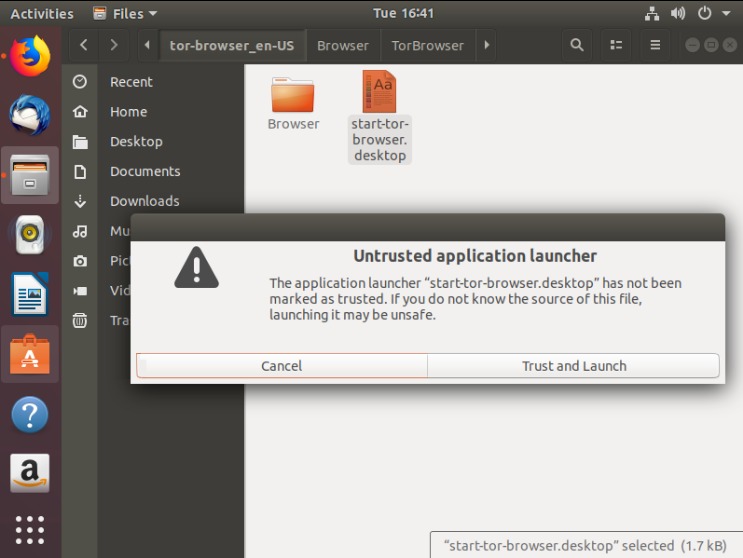
For those venturing into the dark corners of the internet, utilizing the Tor Browser combined with NoScript enhances not only anonymity but also security. It’s crucial to keep these tools activated and properly configured to make the most of your online safety, especially on the often unpredictable deep web.
Usage Guidelines
When navigating the intricate world of the dark web, understanding the usage guidelines for accessing this hidden realm is essential. Utilizing a specialized dark web browser can enhance your experience while ensuring privacy and security. It’s vital to be aware of the risks and responsibilities involved, as the dark web is not only a place for anonymity but also a venue where illegal activities can thrive. By following established guidelines and employing trustworthy tools, users can explore the dark web safely and responsibly.
General Best Practices
When it comes to browsing the dark web, using the right tools is crucial for both safety and accessibility. The dark web is often associated with anonymity, and a significant part of that is achieved through a technology known as onion routing. This approach allows users to navigate the dark web securely while keeping their identity concealed.
First and foremost, it is essential to choose a reliable browser designed specifically for dark web access. One of the most popular options is the Tor Browser, which employs onion routing to encrypt your internet traffic and route it through multiple servers, making it extremely difficult for anyone to track your online activities.
Ensure you keep your browser updated to take advantage of the latest security enhancements and bug fixes. An outdated browser may expose you to vulnerabilities, undermining the very purpose of browsing anonymously. Additionally, consider adjusting the security settings within the browser to limit the risk of exposure to potential threats.
Another general best practice is to avoid accessing personal accounts or providing personal information while on the dark web. Even if you believe a site is safe, it is better to err on the side of caution. Stick to the purpose of anonymous browsing, whether it be for research, privacy, or legitimate inquiries.
Furthermore, familiarizing yourself with common risks associated with dark web access can enhance your safety. Scams, malware, and illegal activities are rampant, so staying informed about what to expect can help you navigate these challenges more effectively.
Lastly, it’s wise to use a VPN (Virtual Private Network) in conjunction with your dark web browser for an additional layer of security. This can help obscure your internet activity further and protect your data from potential threats.
In summary, the key to successfully navigating the dark web lies in using specialized browsers that leverage onion routing, practicing good security hygiene, and remaining aware of the potential risks. Adopting these guidelines will improve your experience while ensuring that your identity and data remain secure.
Avoiding Torrenting
The dark web can be a fascinating and complex part of the internet, offering a variety of resources and communities that aren’t accessible through regular browsers. However, it is important to navigate this space with care to ensure your safety and compliance with local laws. When considering which browser to use for accessing the dark web, one of the most popular options is Tor, known for its emphasis on privacy and security.
When using Tor, it is crucial to understand the guidelines surrounding its use. Avoiding torrenting is essential, as downloading files via torrents can compromise your anonymity and expose you to various legal risks. Torrent files can be traced back to your IP address, undermining the very purpose of using a browser designed to keep your identity hidden.
Additionally, while exploring the dark web, it’s important to remain aware of the potential for encountering illegal content. Engaging with such material can have serious legal implications. Always remember that while the dark web offers tools for censorship circumvention, it is still your responsibility to use them wisely and responsibly.
In summary, utilizing a browser like Tor can provide unique benefits for accessing the dark web, but staying safe requires strict adherence to guidelines. By avoiding torrenting and being cautious about the content you engage with, you can help protect your online presence while exploring this hidden corner of the internet.
Troubleshooting
Troubleshooting can sometimes feel like navigating a maze, especially when you’re trying to access the browser for dark web. Whether you’re dealing with connectivity issues or encountering errors while browsing elusive sites, understanding common solutions can make all the difference. With the right approach, you can confidently dive into the dark web and explore its hidden treasures. Just remember, staying safe and secure is paramount when using a browser for dark web activities.
Accessing the Tor Manual
Accessing the dark web can be a unique experience, but it’s important to know how to troubleshoot any issues that may arise while using the Tor browser. When you encounter problems, it’s best to start with the basics. Ensure your internet connection is stable and that you are using the latest version of the Tor browser. The official Tor website provides a comprehensive manual that can help guide you through common issues.
If you can’t access certain websites or if the browser fails to connect, consider restarting your device or your router. Firewalls and antivirus software can sometimes interfere with Tor’s functionality, so checking their settings may also yield a solution. Additionally, the Tor browser’s built-in circuit connection feature allows for some flexibility, so you can try changing your circuit if specific sites aren’t loading.
Another alternative for anonymous browsing is I2P, which focuses on internal routing and may provide different functionalities than Tor. Having both options available could enhance your dark web experience and troubleshooting methods.
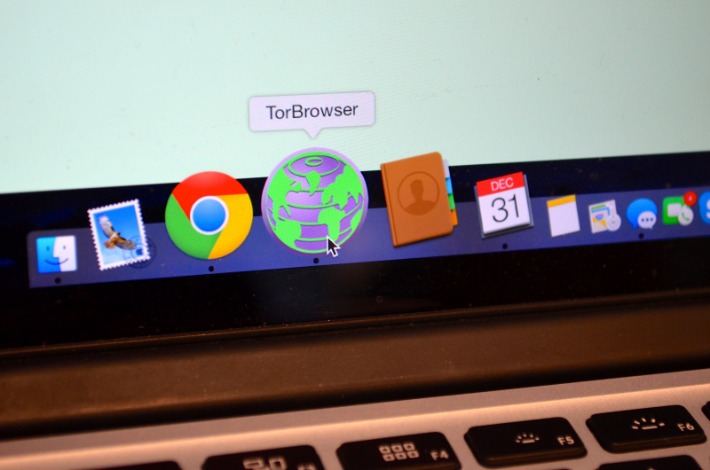
Lastly, don’t forget that the Tor community is active and helpful, with forums and support channels where you can ask for assistance. Sharing your specific issue there can often lead to quick solutions from experienced users.
In summary, keeping your tools updated and knowing where to access help are crucial when navigating the challenges of using the Tor browser for dark web access.
Signature Verification
When navigating the dark web, ensuring that your connection is secure and that you’re utilizing the proper tools is crucial. One common issue that users may encounter relates to signature verification during the installation or update of browser software. Troubleshooting this aspect can help you maintain a safe browsing experience on the darknet.
Here are some steps to troubleshoot signature verification issues:
- Check Your Connection: Ensure that you are connected to a reliable internet source. An unstable connection can cause verification problems.
- Update Your Browser: Always use the latest version of your browser designed for accessing the darknet. Older versions may have unresolved bugs or security flaws.
- Verify Download Integrity: If you downloaded the browser, compare the checksum with the official one to ensure that the file hasn’t been tampered with.
- Look for Errors: Pay attention to any error messages that appear during the verification process, as they can provide insight into what might be going wrong.
- Consult Official Forums: Visit reputable forums or communities associated with the browser for troubleshooting tips or updates regarding signature verification issues.
Taking these steps can help you effectively troubleshoot signature verification problems, allowing you to use your preferred browser safely while exploring the darknet.
Support and Community
In today’s digital landscape, the concept of support and community plays a vital role in navigating the complex world of the internet, especially when it comes to exploring the browser for the dark web. Users often rely on shared knowledge and experiences from like-minded individuals to make informed decisions while maintaining their safety and privacy. By participating in discussions and utilizing resources from trusted communities, individuals can better understand how to effectively use the browser for dark web and discover tools like Freenet to enhance their experience.
Nonprofit Organization Role
In today’s digital landscape, exploring the dark web requires a solid understanding of security and privacy measures. Nonprofit organizations play a crucial role in supporting individuals who seek to navigate this often misunderstood part of the internet. These organizations provide essential services, resources, and community support that empower users to explore the dark web safely while emphasizing the importance of encryption.
Organizations dedicated to this cause often focus on several key areas:
- Education and Awareness: Offering workshops and materials that inform users about the dark web’s potential risks and benefits.
- Support Networks: Creating communities where individuals can share experiences and tips for navigating the dark web securely.
- Resource Availability: Providing tools and guides on how to use specialized browsers while ensuring data protection through encryption.
- Advocacy: Working to raises awareness about digital privacy rights and the importance of safe online practices.
By fostering a sense of community and providing essential resources, nonprofit organizations help demystify the dark web. They empower users to take control of their online experiences while emphasizing the significance of tools that promote safety and anonymity, such as encryption.
Advancing Human Rights
When exploring the dark web, having the right tools is crucial for maintaining safety and privacy. Users often turn to specialized browsers designed for this purpose. These browsers allow individuals to access hidden services while ensuring their data remains secure. A significant aspect of navigating this part of the internet is understanding the importance of encryption.
Encryption acts as a shield, protecting your data from prying eyes as it travels through the complex networks of the dark web. By using a browser equipped with strong encryption features, users can engage with communities that focus on support and advancing human rights without fear of surveillance. This is particularly important for activists, journalists, and others who may be at risk for their work.
Moreover, the dark web offers a unique space for marginalized voices. Support communities can flourish here, providing resources and solidarity for those facing oppression or persecution. In these settings, the role of technology becomes even more critical, as it empowers individuals to connect and organize while maintaining their anonymity.
In sum, navigating the dark web responsibly requires a blend of the right browser and an understanding of essential security principles like encryption. By fostering a safe environment for discussion, these technologies can help advance human rights and support vulnerable communities. As users engage thoughtfully, they contribute to a larger movement valuing freedom and dignity for all.